Telescope Red Dot Finder: Setup and Alignment
A telescope red dot finder helps you aim by showing a non-magnified dot against the sky. Choose one that fits your telescope’s base, align it on a distant daylight target, then confirm it on a bright object after dark.
On this page (8 sections)
- What does a telescope red dot finder do?
- How should you choose a telescope red dot finder?
- How do you mount and align a red dot finder?
- How do you confirm alignment after dark?
- What common red dot finder problems can you fix?
- Is a Telrad different from a red dot finder?
- How should you care for and use a finder?
- Which telescope red dot finder should you choose?
A telescope red dot finder helps you aim at a target without magnifying the sky. Align it by centering a distant target in the main telescope, then moving the finder’s dot onto that same target; check the alignment again after dark.
The eyepiece provides the magnified view. The finder gives you a quick reference for where the telescope is pointed, which makes it easier to bring the Moon, a planet, or a bright star into the eyepiece.
What does a telescope red dot finder do?
A red dot finder shows a dot over the sky through a non-magnifying window. You keep both the sky and your target visible as you move the telescope, instead of looking through a small magnified finder scope.
The dot is useful only when it lines up with the main telescope. If the finder is misaligned, you may point at a star in the window while the eyepiece shows a different patch of sky.
How should you choose a telescope red dot finder?
Choose by the way you want to aim and by the attachment your telescope accepts. A single adjustable dot suits most simple aiming needs, while a ring sight gives you a larger pattern to place against the sky.
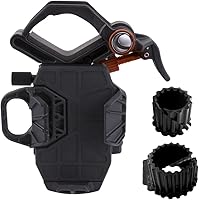
Check the finder’s base before you buy. The SVBONY model includes a dovetail bracket that fits many telescope bases.
Its stated compatibility focuses on several Celestron 80EQ, 80DX, 90DX, SE, SLT, and Omni models. Confirm that your telescope has a matching base.
If you want a compact option with its mounting base included, the Celestron StarPointer is a straightforward choice. It also works with astronomical binoculars and spotting scopes, and its adjustable brightness can be lowered for night use or raised for land targets in daylight.
The SVBONY Red Dot Finder suits buyers whose telescope accepts its dovetail bracket and who want horizontal and vertical thumbwheels for alignment. Skip it if your telescope has a different base and you cannot confirm an adapter will fit.
The Telrad Finder Sight is for someone who prefers illuminated rings over one dot. It shows a 5-degree field with three rings, including a small ring that outlines an area about the size of the Moon.
Skip it if you want a shorter, lighter sight: the Telrad is 8 inches long and weighs 11 ounces.
How do you mount and align a red dot finder?
Mount the finder securely, center a distant target in the main telescope, then adjust the finder until it points to that target. Daylight alignment is easier because rooftops, poles, and other stationary targets are easy to identify.
- Attach the finder to its base, following the finder and telescope instructions.
- Choose a distant target that is safely away from the Sun and far enough away for the telescope to focus.
- Put in a low-power eyepiece, then center the target in the main telescope.
- Keep the telescope still and look through the finder.
- Adjust the dot or rings to line up with the target.
- Look back through the eyepiece and recenter if needed, then repeat the adjustment.
Make small adjustments and check the eyepiece after each one. A nearby fence or tree may be too close for the telescope to focus clearly, so choose a more distant target.
For a first setup, follow how to set up a telescope for the first time. Mounting details differ, so don’t force a bracket or control that does not move smoothly.
How do you align a telescope red dot finder with thumbwheels?
Use the thumbwheels to move the dot horizontally and vertically while the target stays centered in the eyepiece. The SVBONY finder has these two adjustment controls, so make one small change at a time and recheck the main telescope’s view.
Some finders use other adjustment methods. Check the instructions for your model rather than forcing a control that feels stuck.
How do you confirm alignment after dark?
Center a bright star or the Moon in the eyepiece, then look through the finder to see whether its dot or rings mark the same spot. If they do not, recenter the target in the eyepiece and adjust the finder.
Start with the lowest-power eyepiece you have. Its wider view makes it easier to keep the target in sight while you align the finder.
Dim the dot at night so it does not overwhelm the target. For the Celestron StarPointer, turn down the brightness to preserve night vision.
Raise it only when a brighter dot helps you see it. If you want help choosing an eyepiece, see telescope eyepieces explained for beginners.
What common red dot finder problems can you fix?
A dot that is too bright, a loose mount, or poor eye placement can make aiming difficult. Check these simple causes before changing where the telescope points.
- The dot looks like a blob: Lower the brightness. A bright dot can seem larger and cover the target.
- You cannot see the dot: Move your eye slightly behind the window and adjust brightness gradually. If the dot stays off, check the battery and switch.
- The finder points away from the eyepiece view: Align it again, starting with a target centered in the main telescope.
- The target shifts after alignment: Check that the finder and base are secure, then realign after transport or a bump.
- The target is missing from both views: Choose a bright, distant target and use a low-power eyepiece for a wider view.
A red dot finder does not magnify the sky or correct the orientation of the main telescope’s view. The finder shows where the telescope points, while the telescope optics determine what you see through the eyepiece.
Is a Telrad different from a red dot finder?
The Telrad is a non-magnifying sight that uses illuminated rings instead of a single dot. The rings appear against the sky and provide a pattern to guide the telescope toward a target.
Its small ring outlines an area about the size of the Moon, while the larger ring outlines an area seen in a standard finderscope. The Telrad includes a mounting base, but its longer body needs room on the telescope.
Choose the Telrad if those rings give you a more useful aiming reference than a dot. Choose a compact red dot finder if you want a simpler sight with adjustable brightness.
How should you care for and use a finder?
Keep the finder attached firmly and check its alignment whenever you install it or move the telescope. A bump during storage or transport can shift the sight, even if the base still feels secure.
Keep the viewing window clear and handle adjustment controls gently. If your finder uses a battery, switch it off when you finish observing and check the battery if the dot stops appearing.
Before an observing session, check alignment on a bright target. If the finder is off, correct it before searching for a faint object.
Once aligned, keep your eye behind the window and move the telescope until the dot or rings sit over the target.
Which telescope red dot finder should you choose?
Choose the Celestron StarPointer if you want an adjustable dot with a mounting base and included battery, or need a finder that can also work with astronomical binoculars or a spotting scope. Choose the SVBONY if your telescope accepts its dovetail bracket and you want separate horizontal and vertical thumbwheels.
Choose the Telrad if you prefer illuminated rings and have room for its longer body. Once your finder is aligned, what you can see with a 70mm telescope can help you pick suitable first targets; for help choosing a complete setup, see our telescope buying guide for adults and families.
Frequently asked questions
How do you align a red dot finder on a telescope?
Point the telescope at a distant land target in daylight and center it in a low-power eyepiece. Keep the telescope still, then adjust the finder until its dot sits on that target.
Repeat with another target, then confirm alignment after dark.
Should a red dot finder be aligned during the day or at night?
Daylight alignment is often easier because a distant land target is clear and easy to identify. Choose a safe target away from the Sun, then confirm alignment on a bright star after dark.
A bump or a shifted mount can change the alignment.
Why can’t I see the red dot in my telescope finder?
The brightness may be too low or too high, or your eye may not be in the right position behind the window. Adjust brightness gradually and move your head slightly.
If the dot stays off, check the battery and switch.
Does a red dot finder magnify the sky?
No. A red dot finder is a non-magnifying sight, so the sky remains visible around the dot.
The dot marks where the telescope points, while the main telescope and eyepiece provide the magnified view.